Gestión de campo sin hojas de cálculo.
Crea órdenes de trabajo, registra activos, define procedimientos y programa a tu equipo desde una sola plataforma.
No es para anotar trabajos. Es para mejorar tu operación.
Hay decenas de plataformas para gestionar trabajo de campo. Si solo necesitas un listado de pendientes para no olvidarte de nada, cualquiera te sirve.
Pero si quieres una herramienta donde cada orden conoce su activo, cada activo conoce su historial, cada procedimiento se ejecuta igual sin importar quién lo haga, y todo queda registrado para que tu operación mejore mes a mes, necesitas algo más. Eso es massadesk.
Cada trabajo, su técnico, su estado, su historial.
Cuando una orden vive en un correo, otra en WhatsApp y otra en la cabeza del coordinador, las cosas se pierden. El técnico llega al sitio sin la información que necesita y el supervisor no puede decir con certeza en qué van los trabajos del día.
Crea, asigna y cierra órdenes desde una sola pantalla. Cada miembro del equipo, del coordinador al técnico en campo, ve el mismo estado, el mismo historial, las mismas notas. Sin reenvíos, sin dobles registros, sin preguntar en el chat.
Mantenimiento preventivo automático.
Cuando el preventivo no se ejecuta, los equipos fallan en producción. Y cuando fallan en producción, el costo se multiplica por diez. Pero recordar cada fecha, en cada activo, para cada técnico, no escala con un equipo en crecimiento.
Define la recurrencia una sola vez: por fecha fija o por horas de uso del equipo. massadesk crea las órdenes en el momento exacto, las asigna al técnico responsable y deja registrado todo lo que se hizo.
El historial completo de cada equipo.
Cuando un activo falla y nadie sabe cuándo fue su último servicio, alguien tiene que ir a buscar la respuesta en papeles, correos viejos o en la cabeza del técnico que ya no está en la empresa. Cada minuto buscando es un minuto de máquina parada.
Cada equipo tiene una ficha viva: cuándo entró, qué se le ha hecho, qué partes se cambiaron, cuántas horas ha trabajado. Cuando alguien lo necesita, sea en la oficina o frente al activo, está ahí en segundos.
Tu equipo sabe qué hacer cada día.
Sin programación clara, los técnicos llegan a la jornada preguntando qué les toca. Las urgencias mandan, los preventivos se posponen, y al final del mes nadie sabe realmente en qué se fue el tiempo del equipo.
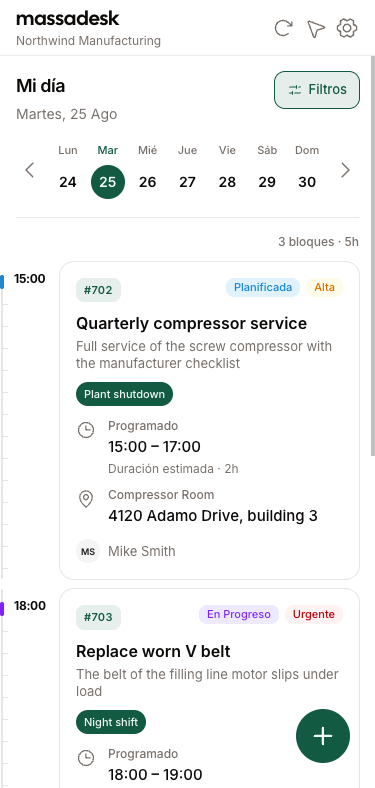
La programación debería ser un mapa, no una lista de pendientes. Asigna desde el calendario, mueve bloques entre técnicos cuando cambia la prioridad, y cada miembro del equipo abre la app y ve exactamente qué le toca, dónde y a qué hora.
El mismo proceso, ejecutado igual cada vez.
El mismo trabajo, hecho por dos técnicos distintos, no debería tener dos resultados distintos. Pero pasa todos los días: uno olvida un paso, otro hace una verificación de más, y el cliente recibe un servicio inconsistente que erosiona la confianza.
Define el procedimiento una sola vez, con sus pasos, fotos requeridas y firmas, y aplícalo a cualquier orden. El técnico no improvisa: completa lo que está, en el orden que está, y todo queda registrado para auditoría o para el siguiente que toque el equipo.
El día del técnico, en su tablero.
El técnico no debería abrir el correo, ni revisar WhatsApp, ni preguntarle al supervisor qué le toca hoy. Toda esa fricción se traduce en horas perdidas antes de empezar el primer trabajo.
Cada técnico abre el tablero y ve la jornada del día, los datos del activo, las fotos del último servicio y los pasos del procedimiento. Se abre directo en el navegador de cualquier teléfono, sin descargas ni tiendas de apps —con un toque queda en la pantalla de inicio— y si pierde la señal, todo sigue funcionando y se sincroniza al volver a línea.
- Trabajos del día
- Detalle del trabajo
- Capturar evidencia
Hecho para equipos que mantienen las cosas funcionando.
Desde líneas de producción hasta equipos hospitalarios y vehículos de flota — donde haya activos que mantener y técnicos que coordinar, massadesk encaja.
Plantas de fabricación
Líneas de producción, equipos de empaque, talleres de herramientas.
Gestión de instalaciones
HVAC, eléctrico, plomería, sistemas de edificios para oficinas y centros comerciales.
Energía y servicios públicos
Subestaciones, parques eólicos, tratamiento de agua, plantas de generación.
Fabricación de alimentos y bebidas
Equipos de cadena de frío, líneas de envasado, procedimientos de sanitización.
Cuidado de la salud
Equipos médicos, ingeniería biomédica, flujos de esterilización.
Gestión de flotas
Camiones, buses, locomotoras, vehículos de última milla.
Un precio. Todo incluido.
Sin tarifas de implementación, sin tiers que esconden lo que de verdad necesitas. Un solo precio fijo para toda tu operación, sin importar cuántos técnicos tengas.
Plan Pro
al mes
Facturación mensual. Cancela cuando quieras. IVA incluido.
Todo incluido
- Técnicos ilimitados
- Mantenimiento preventivo automático
- Procedimientos con fotos y firmas
- Programación con calendario
- Reportes y exportación
- Historial completo
- Activos y partes
- Soporte prioritario
Dudas comunes sobre massadesk.
Empieza a gestionar tu equipo de campo hoy.
Crea tu cuenta, agrega a tu equipo y cierra tu primera orden en menos de una hora. Sin tarjeta de crédito.